Stay Informed: Email Alerts for Your Trading Scripts

January 14, 2026
DipSkip Team

Automated trading means you don't have to watch the market constantly. But "set it and forget it" doesn't mean you want to be completely in the dark. DipSkip's alerts system bridges this gap perfectly—your scripts run autonomously while you receive email notifications about the events that matter most to you.

Why Alerts Matter

Imagine this scenario: you've got a momentum script running on NVDA that buys dips and sells on profit targets. The market opens, you head into a meeting, and three hours later you check your phone to find your script executed five trades while you were gone.

Wouldn't it be nice to know about those trades as they happen? That's exactly what DipSkip alerts provide. You maintain full awareness of your strategy's activity without needing to keep a browser tab open all day.

Five Alert Types for Every Situation

DipSkip offers five distinct alert types, each designed for specific monitoring needs:

1. Symbol Price Alerts

The simplest alert type—get notified when any stock hits a target price. This works independently of your scripts, making it perfect for watching stocks you're not currently trading.

Example: Set an alert for AAPL at $180. When Apple hits that price, you get an email—whether or not you have a script running on it.

2. Loss Amount Alerts

Early warning for when positions move against you. Set a threshold in dollars or percentage, and select which scripts to monitor. You'll know immediately when losses reach your limit.

Example: Set a -10% loss alert on your TSLA script. If your position drops 10%, you get notified instantly—giving you time to review the situation before any stop-loss triggers.

3. Gain Amount Alerts

Celebrate your wins and stay aware of profit targets. Configure in dollars or percentage terms for selected scripts.

Example: Set a +$500 gain alert. When your cumulative profit hits that milestone, you'll know it's time to pop the champagne (or consider taking some profits).

4. Buy Trade Alerts

Know when your scripts are entering positions. Choose to be notified on every buy, or only after a certain number of buys—useful for strategies that average down.

Example: Your dip-buying script is set to accumulate up to 5 positions. Set a buy alert after 3 trades to know when you're getting deep into averaging down territory.

5. Sell Trade Alerts

Stay informed when your scripts exit positions. Like buy alerts, configure for every trade or after a threshold.

Example: Set sell alerts to "every trade" so you know the moment your script locks in profits or cuts losses.

Smart Alert Strategies

Here are some practical ways to use alerts effectively:

The Early Warning System

If your script has a stop-loss at -15%, set a loss alert at -10%. This gives you advance notice that things are moving against you, time to review the position, and the option to manually intervene before the automated stop triggers.

Trade Activity Monitoring

For active day trading scripts, set buy and sell alerts to "every trade." You'll have a real-time log of activity in your inbox, which is perfect for reviewing when you have a moment.

Milestone Tracking

Use gain alerts as milestone markers. Set alerts at +5%, +10%, +15% to track your progress throughout the day. It's motivating and keeps you informed without obsessive chart-watching.

Pro Tip: Combine alerts with your script logic for layered protection. Your script handles the automation, alerts keep you informed, and you maintain the option to manually override when needed.

Getting Started

Setting up alerts takes just a few seconds:

  1. Navigate to the Alerts tab in DipSkip
  2. Select your alert type from the dropdown
  3. Configure the trigger conditions
  4. For script-based alerts, select which scripts to monitor
  5. Click Add Alert

That's it. From now on, you'll receive email notifications whenever your conditions are met.

The Balance of Automation and Awareness

The best automated trading setup isn't one where you're completely disconnected—it's one where you're appropriately informed. Too many alerts and you're back to watching the market all day. Too few and you miss important events.

Find your balance. Maybe that's just sell alerts so you know when trades complete. Maybe it's loss alerts as a safety net. Or maybe it's everything, because you like staying in the loop.

Whatever your style, DipSkip alerts let you stay informed on your own terms—keeping you connected to your strategies while your scripts do the heavy lifting.

Check out the Alerts documentation for complete details on each alert type and configuration options.

Monitor Your Script Performance in Real-Time

January 13, 2026
DipSkip Team

One of the most important aspects of automated trading is knowing exactly what your scripts are doing. DipSkip's dashboard provides comprehensive real-time monitoring tools that give you complete visibility into your strategy's performance, position status, and trade history—all without requiring you to watch the market constantly.

The Dashboard at a Glance

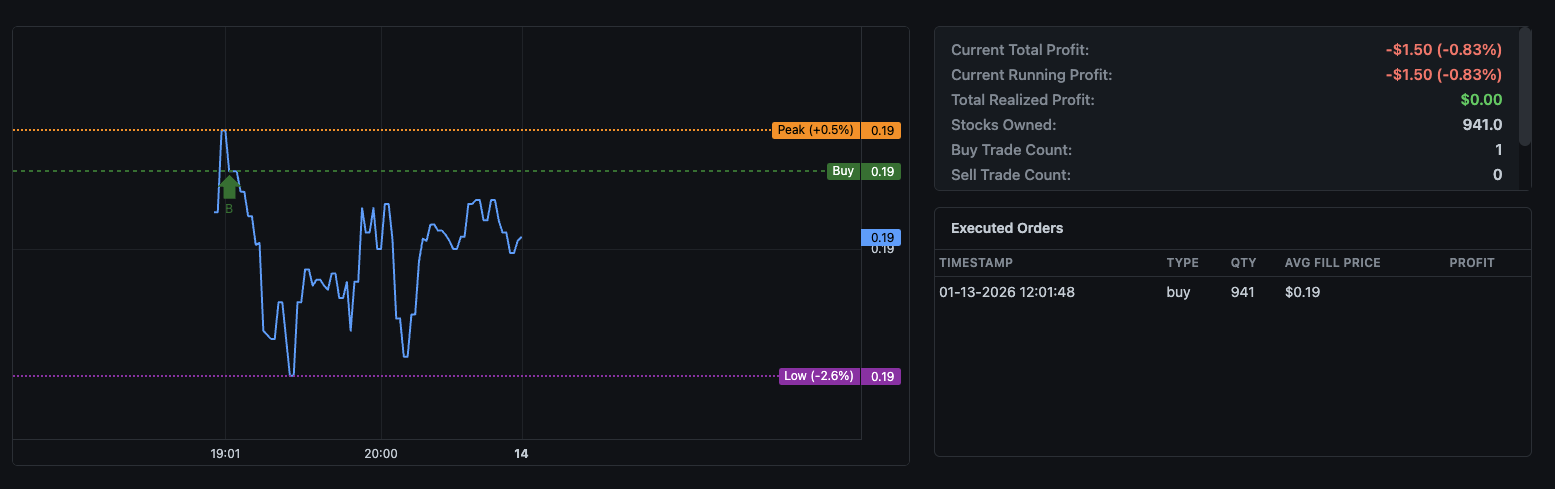
When you navigate to the dashboard, each of your running scripts displays an interactive price chart alongside key performance metrics. This visual combination lets you immediately understand both the market context and how your strategy is responding to it.

DipSkip Dashboard Price Chart

The screenshot above shows a typical dashboard view. On the left, you see the price chart with reference lines. On the right, real-time metrics tell you exactly where you stand. Let's break down what each element means.

Understanding the Price Chart

The price chart is more than just a visual of stock movement—it's a complete picture of your strategy's context. Several reference lines appear automatically based on your trading activity:

Entry and Exit Lines

A green "Buy" line marks your entry price when you're holding a position. This gives you an instant visual reference—is the current price above or below where you bought? A red "Sell" line appears instead when your last action was a sell, showing where you exited.

Peak and Low Tracking

Two additional lines help you understand the price range since your last trade:

  • Peak (Orange): Shows the highest price reached since your last buy, with a percentage indicating how far above your entry. In the example, "Peak (+0.5%)" means the stock reached 0.5% above the buy price at its highest point.
  • Low (Purple): Shows the lowest price reached since your last sell, with a percentage indicating how far below that reference. "Low (-2.6%)" means prices dipped 2.6% below your sell price.

These percentage indicators are incredibly useful for strategy refinement. If you consistently see high Peak percentages but end up selling at lower prices, you might need to tighten your profit-taking triggers. If the Low percentage is always small before you buy, you might be entering too early.

Real-Time Metrics Explained

The metrics panel to the right of the chart provides instant answers to the questions every trader asks:

Profit Tracking

  • Current Total Profit: Your combined realized and unrealized P&L. This is the bottom line—how much you're up or down overall.
  • Current Running Profit: The unrealized gain/loss on shares you currently hold. This changes tick by tick as the market moves.
  • Total Realized Profit: Money you've actually locked in from completed trades. This only changes when you sell.

Position Status

  • Stocks Owned: How many shares you currently hold
  • Buy Trade Count: Total buys executed by this script
  • Sell Trade Count: Total sells executed by this script

Comparing buy and sell counts gives you insight into your strategy's behavior. Equal counts mean you're cycling in and out of positions. More buys than sells indicates you're accumulating or averaging down. More sells is unusual but might happen if you started with existing shares.

Order History at Your Fingertips

Below the metrics, the Executed Orders table shows every trade your script has made. Each entry includes:

  • The exact timestamp when the order filled
  • Whether it was a buy or sell
  • The quantity of shares traded
  • The average fill price
  • For sells, the profit or loss on that specific trade

This audit trail is invaluable for understanding why your strategy made specific decisions. If you see a sell that locked in a loss, you can check the timestamp, look at what the price was doing, and evaluate whether your stop-loss logic is calibrated correctly.

Practical Tips for Using the Dashboard

Morning Check-In

Start each trading day by reviewing overnight activity. If your script traded during pre-market or immediately at open, the dashboard shows you exactly what happened and at what prices.

Strategy Refinement

Use the Peak percentage to evaluate your profit-taking. If you're seeing "Peak (+5%)" but your total profit is only 2%, you're giving back significant gains. Consider tightening your sell triggers or implementing trailing stops.

Risk Assessment

The Low percentage combined with your current position tells you your maximum drawdown exposure. If you bought 1000 shares at $10 and the Low shows -5%, you know you've seen the position go $500 underwater. Is that acceptable for your risk tolerance?

Trade Frequency Analysis

The buy and sell counts reveal how active your strategy is. High counts might mean excessive trading (and commission costs). Low counts might mean your conditions are too restrictive and you're missing opportunities.

Beyond Basic Monitoring

The dashboard is designed to give you confidence that your automation is working correctly. But it's also a powerful tool for continuous improvement. Every data point—every Peak percentage, every trade timestamp, every profit figure—is information you can use to refine your DipScript strategies.

Remember: the goal of automated trading isn't to remove you from the process entirely. It's to handle the mechanical execution so you can focus on strategy and risk management. The dashboard keeps you informed and in control, even while your scripts do the heavy lifting.

Ready to monitor your strategies?

Log in to your DipSkip dashboard to see your scripts in action, or read the documentation for detailed explanations of every chart element and metric.

Mastering the DipSkip Backtester: Test Before You Trade

December 24, 2024
DipSkip Team

One of the most powerful features of DipSkip is the built-in backtester. Before risking real capital, you can test your DipScript strategies against historical price data to see exactly how they would have performed. In this guide, we'll walk through how to use the backtester to refine and validate your trading strategies.

Why Backtesting Matters

Every trader has ideas about what should work in the market. But intuition alone isn't enough—you need data. Backtesting lets you answer critical questions before going live:

  • Would my strategy have been profitable over the past year?
  • What's the maximum drawdown I should expect?
  • How often does my strategy actually trigger trades?
  • Are my profit targets and stop losses set correctly?

The DipSkip backtester runs your exact DipScript logic against price data, simulating every trade as if it happened in real-time. What you test is what you get.

Step 1: Setting Up Your Data

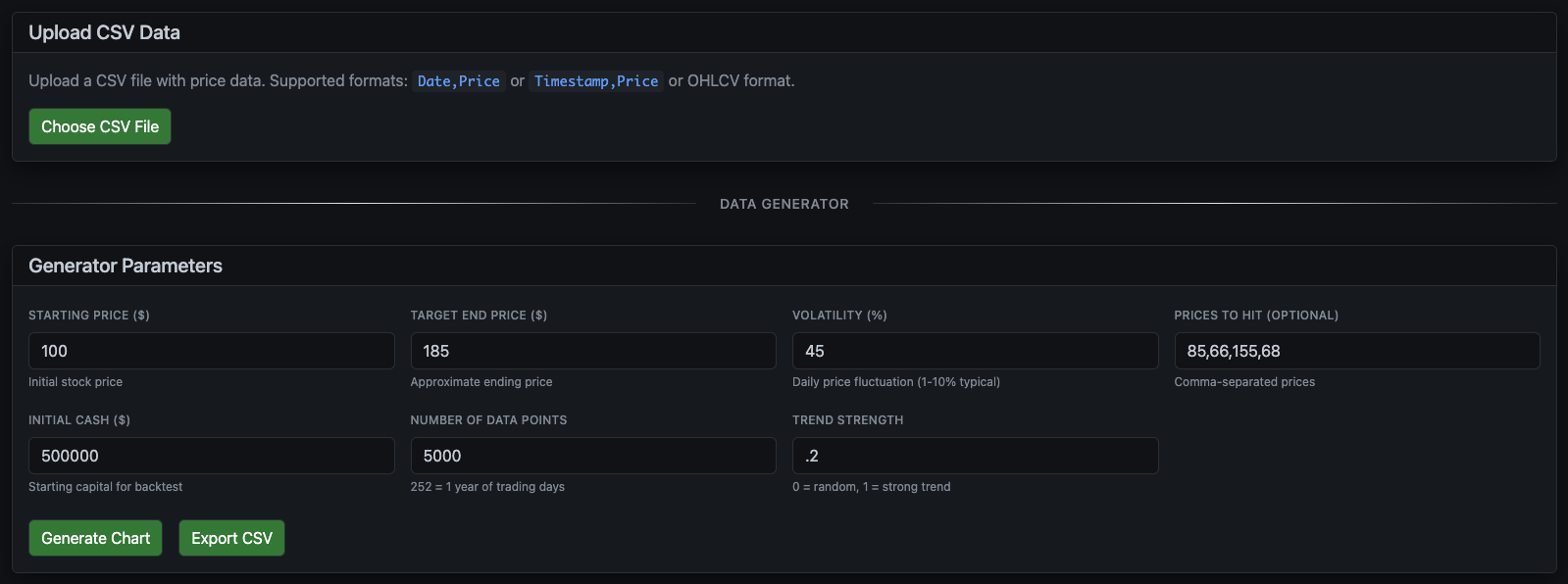
The backtester needs price data to work with. You have two options: upload your own historical data, or generate synthetic price data for testing.

Data Generator Interface

Option A: Upload Historical Data

If you have historical price data (from Yahoo Finance, your broker, or another source), you can upload it directly. The backtester supports multiple CSV formats:

  • Date,Price — Simple daily prices
  • Timestamp,Price — Intraday data with timestamps
  • OHLCV — Full candlestick data (Open, High, Low, Close, Volume)

Option B: Generate Synthetic Data

Don't have historical data? No problem. The Data Generator creates realistic price movements based on parameters you control:

  • Starting Price: Where the stock price begins
  • Target End Price: Approximate ending price (the generator will trend toward this)
  • Volatility: How much daily price fluctuation (1-10% is typical for most stocks)
  • Trend Strength: How strongly prices trend vs. random walk (0 = pure random, 1 = strong trend)
  • Number of Data Points: How many price points to generate (252 = 1 trading year)
  • Initial Cash: Your simulated starting capital
  • Prices to Hit: Optional specific price levels you want the data to include

This is particularly useful for stress-testing strategies against different market conditions—bullish trends, bearish crashes, or high-volatility sideways markets.

Step 2: Visualize and Select Your Script

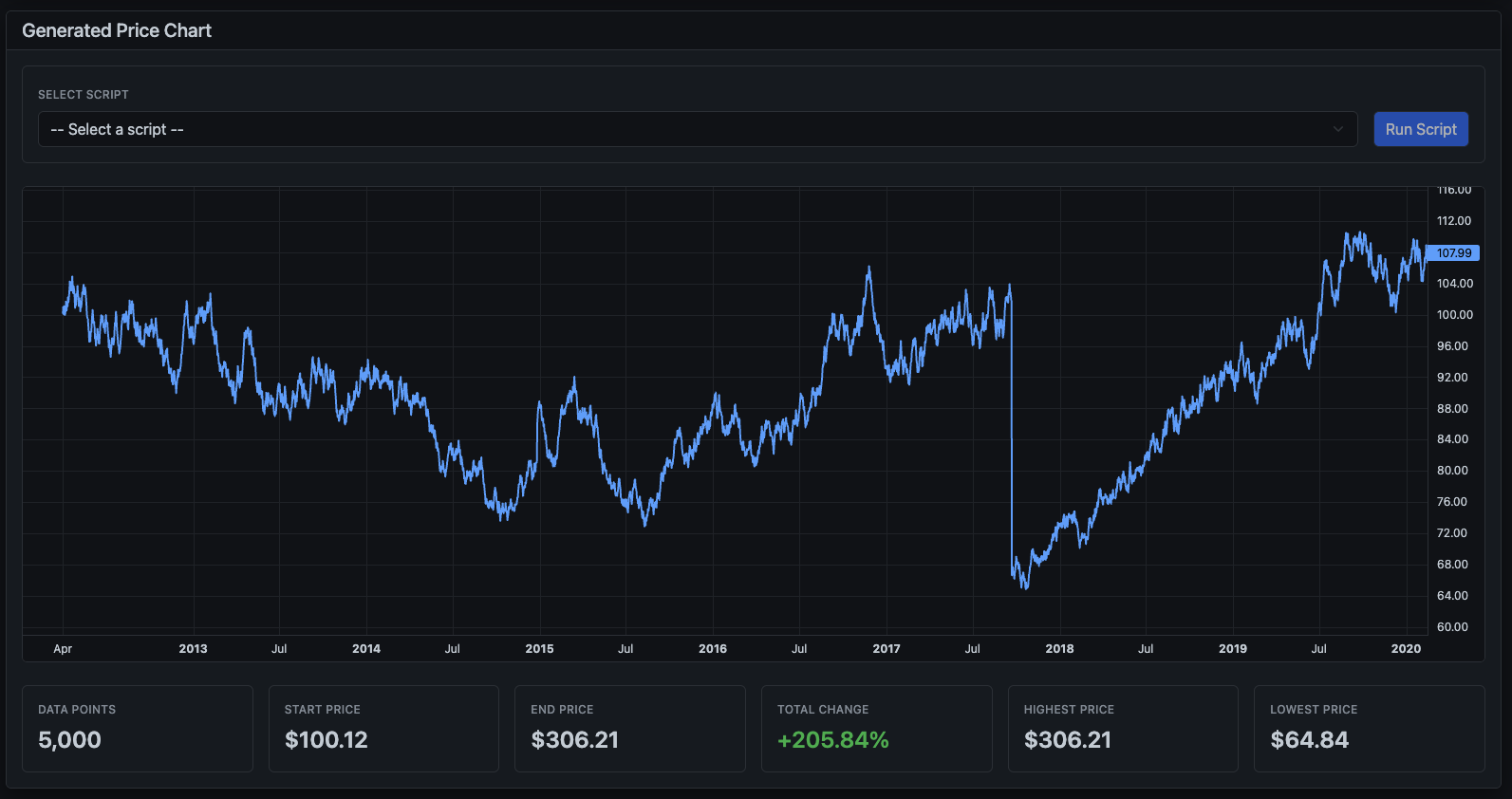
Once your data is loaded, you'll see an interactive price chart showing the full history. Below the chart, key statistics help you understand the data you're working with.

Generated Price Chart

The chart displays important metrics at a glance:

  • Data Points: Total number of price observations
  • Start/End Price: Beginning and ending values
  • Total Change: Overall percentage gain or loss
  • Highest/Lowest Price: The range your strategy will encounter

Use the dropdown at the top to select which of your saved DipScripts you want to test. Then click Run Script to execute the backtest.

Step 3: Analyze Your Results

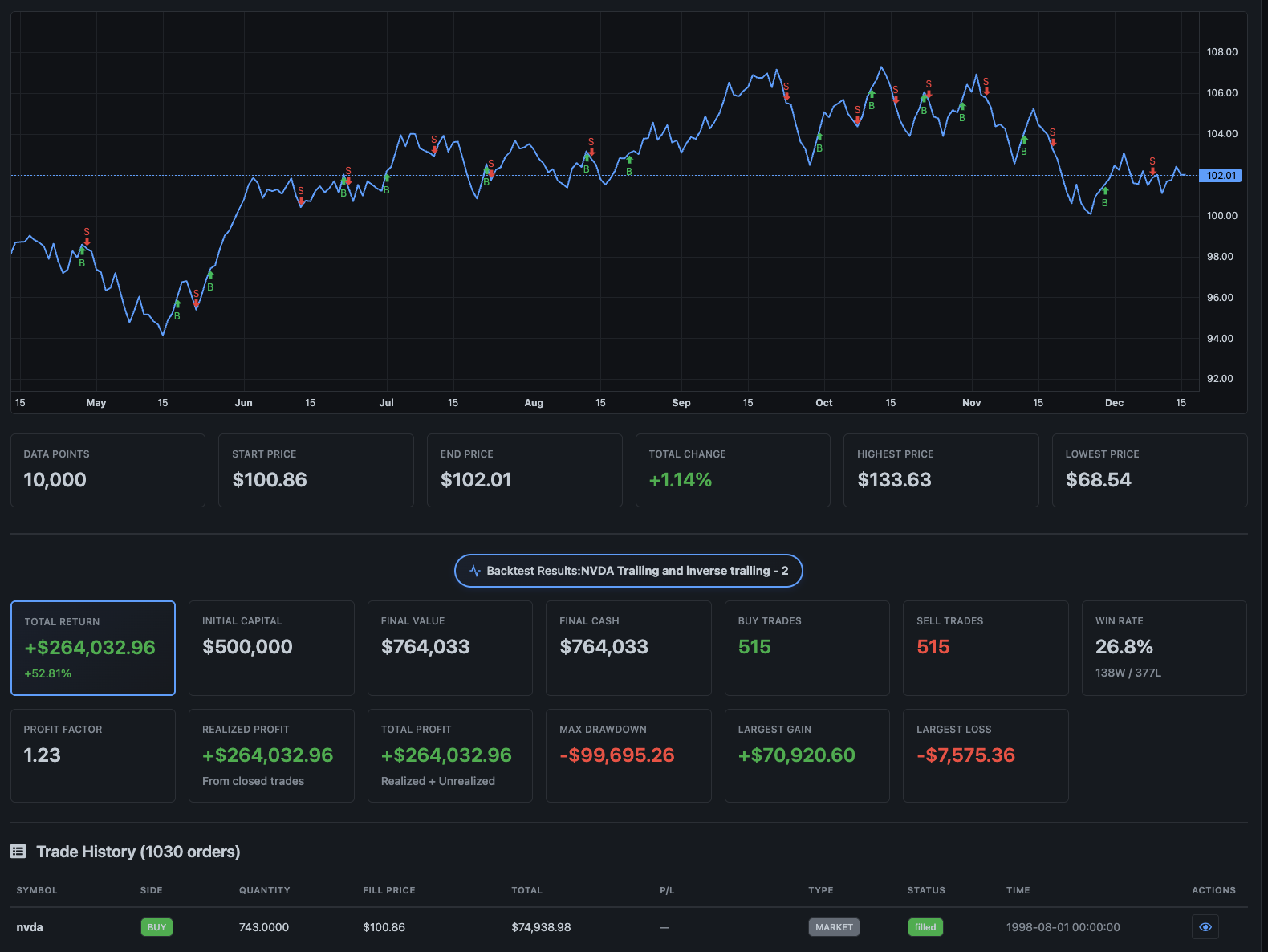
After running the backtest, you'll see comprehensive results showing exactly how your strategy performed.

Backtest Results

The results dashboard includes:

Performance Metrics

  • Total Return: Your overall profit or loss in dollars
  • Final Value: What your portfolio would be worth at the end
  • Max Drawdown: The largest peak-to-trough decline (crucial for risk management)
  • Annualized Gain: Your return normalized to a yearly rate
  • Win Rate: Percentage of profitable trades

Trade Visualization

The price chart updates to show your actual entry and exit points. Green markers indicate buys, red markers indicate sells. This visual representation helps you understand when your strategy is trading and whether the timing makes sense.

Trade History

Below the chart, a detailed trade log shows every single transaction: the date, action, quantity, price, and running totals. Use this to audit your strategy's behavior and identify patterns or problems.

Refining Your Strategy

The real power of backtesting comes from iteration. Here's a typical refinement workflow:

  1. Run initial backtest — See baseline performance
  2. Identify issues — Too many trades? Exits too early? Poor win rate?
  3. Adjust parameters — Modify profit targets, stop losses, or entry conditions
  4. Re-run and compare — Did the changes improve results?
  5. Test different conditions — Try bullish, bearish, and sideways data

For example, if your strategy has a good win rate but small profits, try widening your profit targets. If you're getting stopped out too often, consider loosening your stop loss or adding confirmation conditions.

From Backtest to Live Trading

Once you're satisfied with your backtest results, the transition to live trading is seamless. The same DipScript that ran in the backtester will execute identically in paper trading mode and eventually with real money.

We recommend this progression:

  1. Backtest extensively — Test against multiple market conditions
  2. Paper trade — Run live with simulated money to verify real-time behavior
  3. Start small — Go live with limited capital to build confidence
  4. Scale up — Increase position sizes as you validate performance

Ready to test your strategies?

The backtester is available on Professional and Premium plans. View pricing or read the documentation to learn more about DipScript commands and variables.

Introducing DipSkip: Trading Automation for Everyone

December 5, 2025
DipSkip Team

We're excited to introduce DipSkip, a revolutionary platform that makes automated stock trading accessible to everyone. Whether you're a seasoned trader or just starting your investment journey, DipSkip empowers you to create sophisticated trading strategies without writing a single line of complex code.

The Problem with Trading Automation

Traditional trading automation has always faced a critical challenge: it's either too simple to be effective, or too complex to be accessible. Manual trading requires constant monitoring and split-second decisions. Professional algorithmic trading platforms demand extensive programming knowledge and can cost thousands of dollars per month.

Most traders find themselves stuck in the middle—knowing what strategies they want to execute, but lacking the tools to automate them effectively. This is where DipSkip changes the game.

Meet DipScript: Plain English Trading Logic

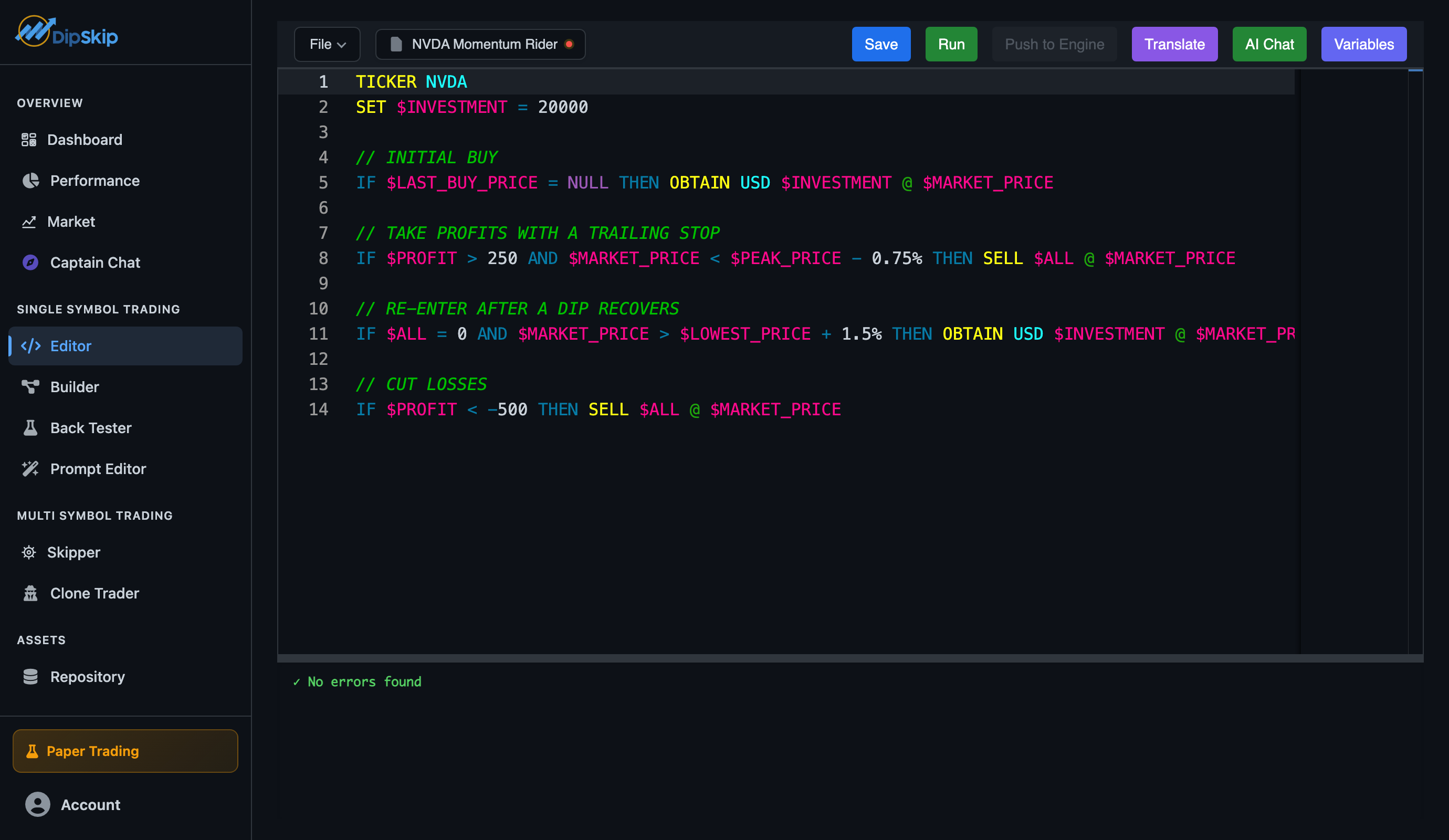
At the heart of DipSkip is DipScript, our proprietary Domain-Specific Language designed specifically for trading automation. DipScript reads like plain English, making it intuitive for anyone to understand and write trading strategies.

Here's a real example of a DipScript strategy:

TICKER TSLA

IF $PROFIT > 200 THEN SELL $ALL @ $MARKET_PRICE

IF $PROFIT < -100 THEN SELL $ALL @ $MARKET_PRICE

IF $MARKET_PRICE < $LAST_BUY_PRICE - 5 THEN OBTAIN 10 @ $MARKET_PRICE

That's it. No complicated syntax, no obscure programming concepts—just straightforward logic that executes exactly as you'd expect. This strategy implements profit targets, stop losses, and position averaging in just four readable lines.

Built for Safety and Control

We understand that automated trading involves real money and real risk. That's why DipSkip comes with enterprise-grade safety features built in:

  • PDT Protection: Automatic Pattern Day Trader rule enforcement prevents SEC violations
  • Paper Trading Mode: Test strategies risk-free with real market data before going live
  • Margin Controls: Set position limits and maximum investment amounts to control risk
  • Real-time Validation: Syntax checking and logic validation catch errors before execution
  • Historical Backtesting: Test strategies against years of market data to validate performance

Powerful Features, Simple Interface

DipSkip doesn't sacrifice power for simplicity. Our platform includes everything serious traders need:

  • 19 Built-in Variables: Track profit, positions, prices, and market conditions automatically
  • AI-Powered Assistant: Get instant help writing and debugging strategies
  • Multi-Script Management: Run multiple strategies simultaneously across different stocks
  • Custom Execution Intervals: From 5-second scalping to 5-minute swing trading
  • Direct Brokerage Integration: Seamless connection with Tradier for live trading
  • Real-time Logging: Watch your strategies execute with detailed execution logs

Perfect for Day Trading

Day traders will love DipSkip's rapid execution capabilities. With execution intervals as fast as 5 seconds on our Premium plan, you can implement sophisticated scalping and momentum strategies that react to market movements in near real-time.

Our platform tracks every variable you need for day trading: profit, peak profit, buy/sell counts, last trade prices, and more. Write strategies that adapt to market conditions automatically, taking profits when targets are hit and cutting losses before they grow.

Transparent, Affordable Pricing

We believe trading automation should be accessible to everyone. DipSkip starts at just $39/month for our Basic plan, with Professional ($69/month) and Premium ($129/month) tiers offering faster execution and advanced features like backtesting and unlimited AI assistance.

No hidden fees. No lock-in contracts. Cancel anytime. All plans include paper trading, real-time market data, and our core automation platform.

Join the Revolution

Trading automation shouldn't require a computer science degree or a six-figure budget. With DipSkip, anyone can automate their trading strategies and focus on what really matters: developing winning strategies and managing risk.

Whether you're looking to automate a simple buy-the-dip strategy or implement complex multi-condition trading logic, DipSkip gives you the tools to do it right. Start with paper trading to build confidence, then go live when you're ready.

Ready to get started?

Visit our pricing page to choose your plan, or explore our documentation to learn more about DipScript.